How long is a typical Shopify product quiz?
Between 5 and 12 questions. Okendo suggests 5 to 10 as "a good starting point". RevenueHunt calls 6 to 12 "the sweet spot", with 7 to 8 the most common length among its best-converting quizzes, and it usually puts an email question last or second to last.
There's a reason quizzes are that long. Each answer narrows the choice, and with too few questions, Okendo notes, there may not be enough to go on for a good recommendation.
How many shoppers finish a quiz?
About 6 in 10 of those who start. Okendo, which makes a quiz tool for Shopify, gives an average completion rate of around 60%, counted as completions divided by starts. RevenueHunt says a rate below 50% means the quiz is "too long, too text-heavy, or asking for personal data too early".
Where people leave, according to RevenueHunt: at the start, at a question in the middle that's "confusing or one too many", and above all at the email question, which it calls "typically the highest drop-off point in any quiz".
To be fair to the quiz apps: shorter isn't automatically better for sales. RevenueHunt reports that across its stores, quizzes of 9 to 12 questions convert best (11.0%), and quizzes under 6 questions do worse (9.8%). It doesn't publish how it measured this, and it's a vendor reporting on its own product. But it's a fair warning that cutting questions can also cut the quality of the match.
Why gift shoppers are different
A quiz works when the person answering is the person using the product. "What's your skin type?" is easy for yourself and a guess for your sister-in-law.
Black Friday is when many of those guesses happen. In the US, NRF counted a record 202.9 million people shopping over the 2025 Thanksgiving weekend, 85.7 million of them online on Black Friday itself. By then 84% had started their holiday shopping, and they still had 53% of it to do. Those are US figures; we haven't found an equally recent European count. But the pattern is familiar to anyone who runs a shop: in late November, more of your visitors are buying for someone else.
A gift shopper usually knows two things for sure: who the present is for, and roughly what they want to spend. Those are the questions worth asking. One of them, answered, already cuts a small catalogue down to a handful of products.
What do Shopify quiz apps cost?
All the quiz apps we checked charge by how much the quiz is used, so a busy Black Friday week counts. Prices are in US dollars, as listed on each app's own Shopify App Store page.
| App | Free plan | First paid plan | Included each month | Free trial |
|---|---|---|---|---|
| RH Product Quiz Builder (RevenueHunt) | Yes, up to 100 quiz responses a month | $39 a month | Up to 500 quiz responses | 15 days |
| Octane AI Advanced Quiz Maker | No | $50 a month (Basic) | 400 credits; 1 credit = 1 completed quiz, AI features use extra | 14 days |
| Quiz Kit Product Quiz Maker (Presidio) | Only for development stores | $59 a month (Scale) | Unlimited quizzes; no other limit listed | 10 days |
| VQB AI Product Quiz Builder | Yes, one quiz of up to five questions, 50 sessions a month | $30 a month (Convert) | 500 quiz sessions, then $0.08 per extra quiz | 14 days |
| Shopify Search & Discovery | Free | Not a quiz | Related and complementary products, filters | Not needed |
The bigger plans: RevenueHunt Pro is $99 a month (1,000 responses) and Premium $199 (2,500). Octane AI Plus is $200 a month with 2,200 credits, and Enterprise starts at $500. VQB has plans at $50 and $100 a month. All checked on 28 October 2026.
What you get for that money is real: quiz builders, branching logic, results pages that explain each pick, and in several of them a link to email tools such as Klaviyo. If you want an email list segmented by the answers, that's a big part of the value.
How to build a one-question gift finder in Shopify, without an app
This takes an afternoon, and works on any Shopify theme.
- Choose the one question. Pick the one whose answer splits your products best. For a gift shop that's often "Who's it for?" (a partner, a parent, a child, a friend) or "What would you like to spend?" (under €25, €25 to €50, over €50). Four or five answers is plenty; add "Not sure yet" so nobody is stuck.
- Tag your products. Give each product the tags that match the answers, such as
for-kidsorgift. Price answers need no tags. - Make one automated collection per answer. In Shopify, an automated collection can use conditions such as "Product tag is equal to for-kids" or "Price is less than 25". New products that match are added on their own.
- Make a "Gift finder" page. Put the question at the top and one button per answer, each linking to its collection. Shopify's free Search & Discovery app lets shoppers filter those collections further by price, product type, tag or vendor.
- Put it where gift shoppers land. A banner on the home page, a menu item, the top of your gift guide and your Black Friday emails.
- Check it on a phone. Most of your Black Friday visitors will see it there. The buttons should fit on one screen without scrolling.
The weakness of this version is that shoppers have to find the page. It doesn't come to them on the product page where they're hesitating.
What one question looks like on a product page
That's what Signal does. Here is the question on our demo shop, Hearth & Home, a small homeware shop with 30 products:
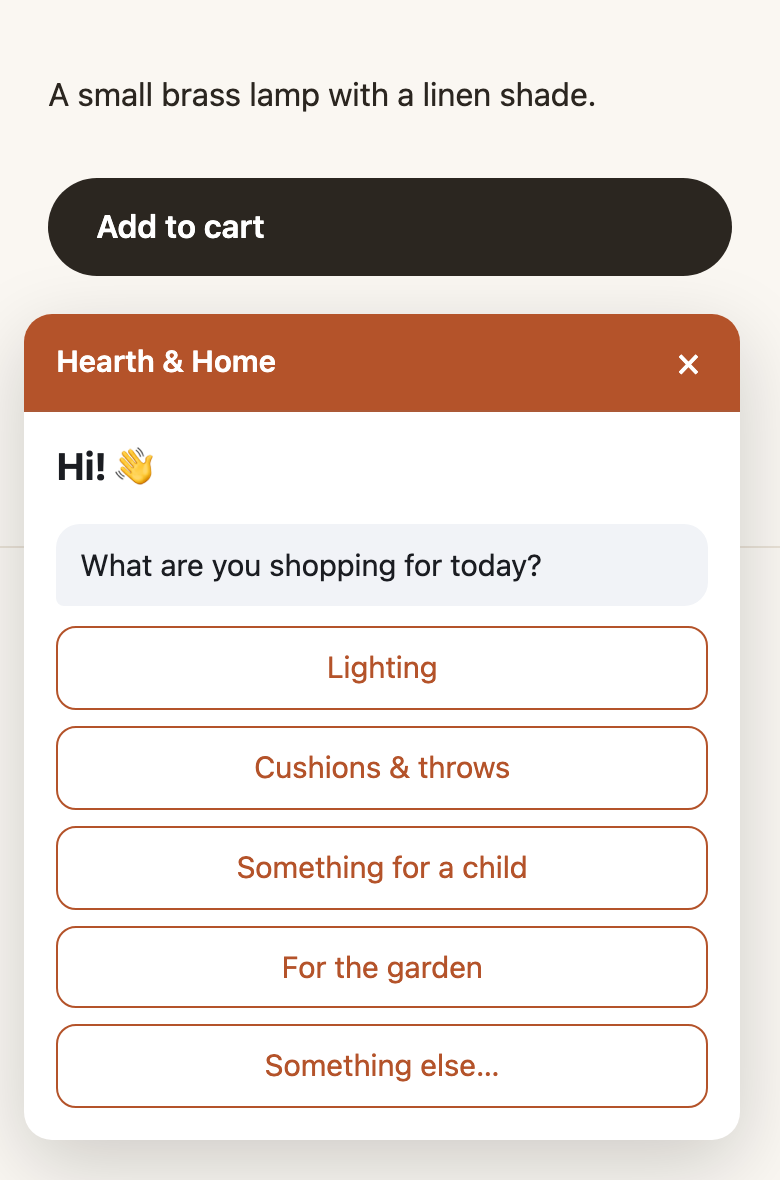
Each answer is set to filter the shop's catalogue:
| Answer | What it matches |
|---|---|
| Lighting | Products of the type "Lamp" |
| Cushions & throws | The "living" collection, tagged "Gift" |
| Something for a child | Products tagged "Kids" |
| For the garden | Products tagged "Outdoor" |
| Something else… | No filter; the shopper types a short answer, saved with their visit |
On the demo, a shopper who answers gets a follow-up about budget (under €40, €40 to €100, over €100), and then "Thanks! Want a few ideas that fit?" with up to three products in the same small window. You can stop at one question; the second is there because budget matters for this shop.
How it works behind that window:
- It reads your public catalogue. You connect your Shopify shop in Signal's settings, and Signal reads your shop's public product list every 6 hours. It sends nothing about your visitors to Shopify.
- The matching is plain rules. Each answer can filter by product type, tag, collection or price. Only products in stock are shown, the most viewed and most added to cart in the last 30 days first. No AI model picks the products.
- If nothing matches, it drops the last answer and shows the closest products, marked as such, rather than an empty list. When more products match than fit in the window, it links to your own collection page with the rest.
- Add to cart from the window works for products with a single variant that's in stock. Products with sizes or colours open their product page, so the shopper picks the variant there.
- It only asks when it helps. Signal asks when it isn't sure what a visitor wants and the answer would change what to show. It never asks the same question twice, and waits after a "no thanks". On the demo, someone who has viewed two products is offered "similar pieces" without being asked anything.
There's more on the logic on how Signal works. Plans start at €39 a month.
What Signal doesn't do
So you can compare it fairly with a quiz app:
- It isn't a quiz builder. No multi-step quiz pages, no results page explaining each pick, no images on the answer buttons.
- It doesn't grow an email list from the quiz. It can offer an early-access or newsletter sign-up to the visitors it fits, with your consent wording, but it doesn't send answers to Klaviyo.
- Product recommendations are Shopify-only for now. Questions and offers work on any shop that lets you add a script.
- It shows at most three products at a time. That suits a gift shopper on a phone; it doesn't suit someone who wants to browse forty.
When is a full quiz the better choice?
- The right product depends on several facts. Skincare by skin type and concern, running shoes by gait and distance, coffee by brewing method and taste. One question can't get there, and a wrong match costs you a return.
- Your shoppers buy for themselves. Someone choosing their own supplements will answer eight questions happily, because each one is about them.
- The quiz is your email engine. If you plan to send different emails based on the answers, the apps above are built for that, and Signal isn't.
- The quiz is part of your brand. Some shops' quizzes get shared and talked about. A small window in the corner won't do that.
One question is the lighter choice when your catalogue is small enough that one answer narrows it to a handful of products, when many of your November visitors are buying gifts, and when you'd rather not pay by quiz take in your busiest week. Our view, from building Signal: start with one question, see which answers people pick, and only add a second when the first leaves too many products to choose from.
What to do before Black Friday
Black Friday is on 27 November 2026, so you have four weeks.
- This week: pick your question and answers, tag products, make the collections.
- Next week: add the gift finder page or the question on your product pages, and test it on a phone.
- Mid-November: look at which answers are chosen most and make sure those collections have enough stock for the weekend.
For the rest of the run-up, see the 5-week Black Friday plan for small shops, Black Friday without big discounts for gift-friendly offers like longer returns, and why one question annoys shoppers less than a Black Friday popup.